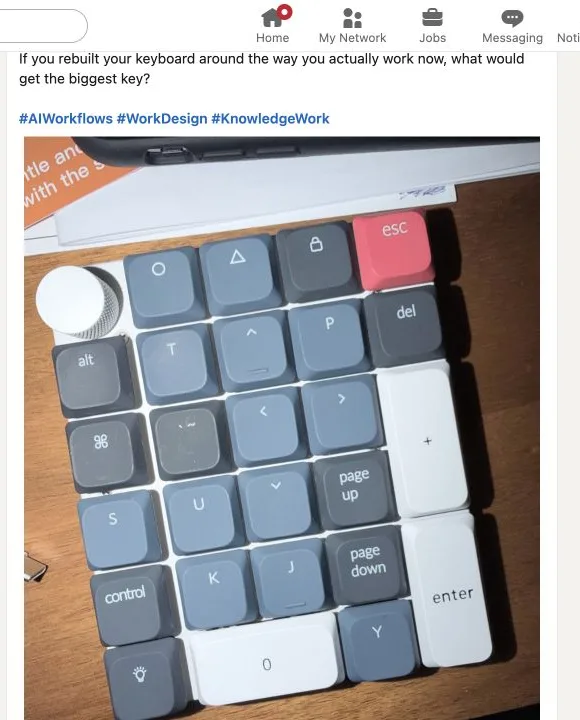
This is a study for a 26-key keypad for AI-assisted work. It is not a replacement for a keyboard. It is a way to make a small set of recurring AI actions physical and deliberate.
Every key needs four things: a clear purpose, a target, a visible response, and a limit. The interactive map below shows the current proposal. Select any key to see what it would do.
Interactive map
Try the keypad
Select a key to see its purpose, response, and limits.
Development
Deepen
Take the selected direction one level further.
What happens next
Show the next layer as a continuation attached to the active branch.
If the target is unclear
Use the active frame; if there is none, ask what should be deepened.
What changes
Add a linked deepening artifact to the current branch.
Limit
Never replace the selected source text.
Attention
Capture
Development
Judgment
Coordination
Utility
OriginThe project began in response to this provocation about redesigning the keyboard around contemporary work.
The prompt could have led to a row of application shortcuts. Instead, the study asks which moves recur across writing, design, research, and coordination. The labels below name those moves in ordinary language.
Deepen
Take the current direction one level further.
Branch
Create a materially different direction beside the original.
Counter
Develop the strongest serious opposition to the current claim.
Synthesize
Combine material while keeping differences and sources visible.
Prototype
Give an idea a small external form that can be examined.
Zoom out
Move from the selected object to the larger system around it.
Range
Change how much surrounding material the command can use.
02/Making intent physical
Putting these commands on a physical surface creates two design problems. The keys have to be findable without rereading all 26 labels. And the same key has to know what part of the work it is acting on.
Attention
Define what is in view.
Capture
Add material without deciding what it means.
Development
Extend or change the work.
Judgment
Inspect and assess.
Coordination
Package, assign, or record work.
Utility
Adjust range or reverse an action.
A press cannot go straight from a label to an action. The system first has to identify the target, show what it plans to do, and make the consequence reviewable.
Key pressedPrototype
TargetSelected frame
Output contractInteractive HTML, new draft
ReviewNothing runs yet
Target checkPaused
Deepen
Needs a target
No target is assumed. Choose what to deepen:
Current block
Open document
Writing frame
Deepen stops when “this” could refer to more than one thing. It asks instead of using the most recent material by assumption.
Output contractReady for review
Prototype
Nothing has run yet
Target
Selected frame
Output
Interactive HTML
Destination
New project draft
Before Prototype runs, the interface names what it will use, what it will make, and where the result will go.
03/The prototypes pushed back
Building clickable states showed where the first map was too vague. The revisions below are interface models, not observed usability results.
Revision 01
Make the target explicit
Earlier
Deepen
Target
No resolved target
Range
Document
Status
Paused
Revised
Deepen
Target
Unresolved
Range
Document
Control
Turn to choose · press to confirm
Status
Paused — choose one
The revision separates the target, the range, and the control used to confirm a choice.
Revision 02
Name the output before running
Earlier
Prototype
Target
Focused object
Action
Proceed with visible inference
Revised
Prototype
Target
Selected frame
Output
Interactive HTML
Destination
New project draft
Status
Ready — review contract
The revision names the output contract before anything can run.
Revision 03
Separate preparation from delegation
Earlier
Delegate
Brief
Writing brief
Range
Project
Status
Prepared — not started
Revised
Delegate
Executor
Research agent
Brief
Writing brief
Attachments
Read-only
Output
Source-backed comparison memo
Done
Three viable options and a recommendation
Permissions
Read sources · write new draft · no send
Cost
Up to 15 min · up to $2
Start
Manual
The revision turns a vague one-press command into Prepare, Review, and explicit Start.
What changedEach revision changed what the system had to show. It did more than make the screen look cleaner.
04/What remains unresolved
Ongoing
The current model is still a proposal. There is no physical keypad, application bridge, or evidence from observed use.
The open questions are practical: which labels become familiar through use; how targeting works without returning to a mouse; how much state belongs on the keypad and how much belongs on screen; and what permission and reversal should mean across applications.
55g
Everyday keys and Stop
67g
Keys that create outputs or commitments
Detented knob
One step at a time; press to confirm
Stop moved from 67g back to 55g. A heavier switch made stopping feel like a commitment when it should be immediate.
The next useful step is to build a small physical prototype and watch where the labels, targeting rules, and review states break down.